In the rapidly evolving digital landscape, creators, developers, and prompt engineers face a common challenge: information overload. We are constantly juggling code snippets, AI prompts, content drafts, and research notes across a dozen different tabs and applications. The need for a centralized, lightweight, and secure repository has never been greater.
Enter Fewne Creator Notes, a streamlined web-based utility designed to bridge the gap between a private scratchpad and a public knowledge-sharing platform. Whether you are a technical blogger looking to store code or a prompt engineer building a library of LLM instructions, this tool offers a unique blend of simplicity and power.
In this guide, we’ll explore the features, security protocols, and creative use cases that make Creator Notes a must-have in your productivity tech stack.
What is Fewne Creator Notes?
At its core, Fewne Creator Notes is a high-performance online notepad system built for the modern web. Unlike bloated project management tools that require extensive onboarding, Creator Notes focuses on text-first efficiency.
What sets it apart is its dual nature. It functions simultaneously as a private digital vault and a public discovery engine. While most note-taking apps lock your data in silos, Creator Notes allows you to decide exactly how “discoverable” your information is. With a robust global search feature integrated into the sidebar, it transforms from a simple editor into a community-driven knowledge base.
Core Features: Built for Speed and Security
To understand why this tool is gaining traction among technical professionals, we need to look under the hood at its primary features.
1. The Dynamic Online Notepad System
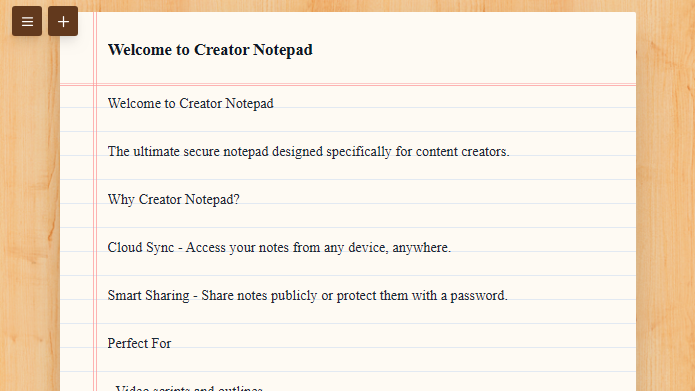
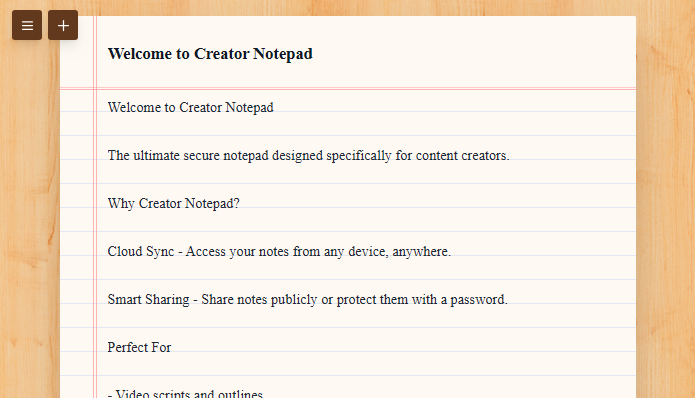
The user interface is minimalist by design. It provides a distraction-free writing environment where the focus remains on the text. The editor is responsive, meaning you can jot down an idea on your mobile device during a commute and refine it on your desktop later.
2. Granular Visibility Controls
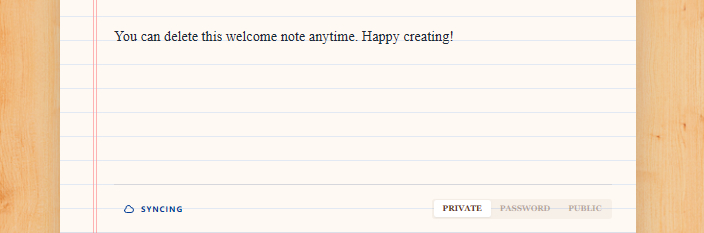
Not all notes are created equal. Creator Notes offers three distinct layers of visibility:
- Public Notes: These are indexed and searchable via the global sidebar. They are perfect for sharing tutorials, public prompts, or open-source documentation.
- Private Notes: Encrypted and hidden from the public directory. These are your eyes-only drafts and sensitive data.
- Password-Protected Public Notes: A middle ground that allows you to share content with a specific audience (like newsletter subscribers or clients) without making it available to the general public.
3. Global Search Functionality
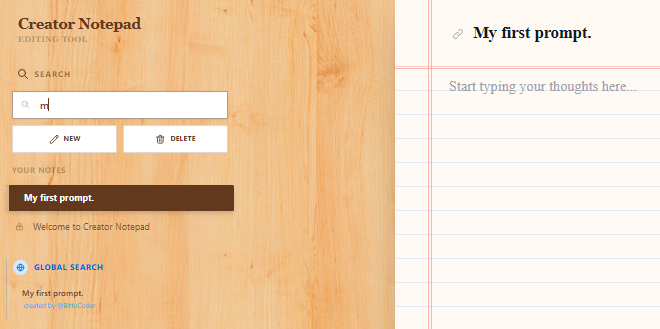
The sidebar isn’t just a list; it’s a portal. The global search functionality allows users to browse through public notes created by the community. This turns the platform into a “Public Brain” where creators can learn from one another, find inspiration, or repurpose shared templates.
4. Enterprise-Grade Data Safety
In an era of frequent data leaks, Fewne emphasizes a “No Data Breach” philosophy. By utilizing secure database storage and modern encryption standards, the platform ensures that your private notes stay private. The infrastructure is optimized for data integrity, ensuring your notes are saved instantly and are accessible whenever you need them.
How to Get Started: A Creator’s Workflow
Using Creator Notes is intuitive, but mastering its workflow can significantly boost your productivity.
Managing Your Content
Creating a note is as simple as typing and auto save. The system allows you to organize your thoughts without the friction of complex folder hierarchies. You can update your content in real-time, making it an excellent tool for “living documents” that evolve over time.
Sharing and Protection
When you’re ready to share, the platform gives you total control. If you’re a developer sharing a specific API configuration, you might set it to Public. If you’re a writer sharing an exclusive chapter with a patron, you can apply a Password and send them the link. This flexibility eliminates the need for third-party file-sharing services.
Global Discovery
By using the sidebar search, you can tap into a collective library. Need a specific “System Prompt” for GPT-5? Search for it. Looking for a Markdown cheat sheet? It’s likely already there. This “Search-First” approach encourages a collaborative ecosystem.
Practical Use Cases for Creators and Developers
How can you actually use Fewne Creator Notes in your daily routine? Here are a few high-impact scenarios:
1. AI Prompt Engineering Storage
Prompt engineering requires version control. You can use Creator Notes to store different versions of your prompts, categorize them by use case (e.g., “Image Gen,” “Code Refactoring”), and keep them ready for a quick copy-paste.
2. Personal Knowledge Base (PKM)
Developers can store “Code Recipes”—those 5–10 lines of code you use constantly but can never quite remember. By making these notes private, you create a personalized, searchable technical manual.
3. Text-Based File Storage
Sometimes, you just need to move text from one device to another without emailing yourself. Creator Notes acts as a seamless bridge for text-based data transfer.
The Future of Creator Notes: Creative Possibilities
As the platform grows, the potential for creative applications is limitless. Imagine:
- Interactive Documentation: Developers could host “Live READMEs” that the community can contribute to or reference.
- Collaborative Prompt Hubs: A place where prompt engineers “battle-test” instructions and share the most effective ones via the global search.
- Ghostwriting Portfolios: Writers can host password-protected samples for potential clients, ensuring their work is visible only to the right people.
Frequently Asked Questions (FAQ)
Is Fewne Creator Notes free to use?
Yes, the core functionality of creating, saving, and sharing notes is designed to be accessible for creators at all levels.
Can anyone see my private notes?
No. Private notes are stored securely in the database and are linked only to your session/account. They do not appear in the global search or sidebar.
How does password protection work?
When you set a password for a note, the content is hidden behind a gate. Even if someone has the URL, they cannot view the text without entering the correct credentials.
Is there a limit to how many notes I can create?
The platform is built for scale, allowing creators to maintain extensive libraries of text-based content without arbitrary limits.
Is the tool mobile-friendly?
Absolutely. The web-based interface is fully responsive, working seamlessly across smartphones, tablets, and desktops.
Conclusion: Why Every Creator Needs This Tool
The digital world is noisy, but your workspace shouldn’t be. Fewne Creator Notes offers a rare combination of simplicity, security, and community. It strips away the unnecessary features of modern “productivity” apps to give you what you actually need: a reliable place to think, write, and share.
Whether you are securing your next great idea in a private note or contributing to a global library of knowledge, Creator Notes provides the infrastructure for your success.
Ready to declutter your digital brain? Visit Fewne Creator Notes today and start building your organized future.
Newsletter Signup
Get notified when new tools go live